Agent Framework DevUI in C# with Claude
Summarize with AI
The assistants open a new chat that asks for a short summary of this post.
The idea: DevUI is a page in your own web app that can run every agent and workflow the app registers. That makes it a good bench on your machine and a leak anywhere else.
Every app in this series so far is a console app: change the question, run it again, read the output. DevUI replaces that loop with a chat page. It lists the agents and workflows the app registers, runs them, and shows each tool call and token count as it happens. It is not a separate tool. It is a set of endpoints mapped into an ASP.NET Core app, so it sees the agents exactly as the app configures them. Below, the kitchen assistant with its pantry tools and the planner and reviewer workflow from the first workflow post move into one web app, Aspire starts it with the API key, and DevUI and the endpoints it calls exist only in Development.
Versions: Microsoft Agent Framework 1.24.0, .NET 10, Aspire 13.6.1. DevUI and the hosting packages are prereleases: Microsoft.Agents.AI.DevUI and Microsoft.Agents.AI.Hosting are 1.24.0-preview.261006.1, and Microsoft.Agents.AI.Hosting.OpenAI is 1.24.0-alpha.261006.1.
Code: samples/agent-framework/13-devui, a runnable version of this post with its tests.
Who this is for: C# developers who have an agent with tools and a workflow, and run them from an Aspire AppHost as in Agent Framework OpenTelemetry tracing in C# with Claude.
Note
The code runs on Claude Haiku 5.5, but it depends only on IChatClient: the first post shows the swap to OpenAI or Ollama.
The output limit of 4,096 tokens is sized for Haiku, which counts its reasoning as output.
A web app instead of a console app
DevUI is mapped into an ASP.NET Core app, so the project starts from the web template. Microsoft.Agents.AI.DevUI depends on Microsoft.Agents.AI.Hosting and Microsoft.Agents.AI.Hosting.OpenAI, so one prerelease package brings in all three:
dotnet new web -n KitchenBenchcd KitchenBenchdotnet add package Microsoft.Agents.AI --version 1.24.0dotnet add package Microsoft.Agents.AI.Anthropic --version 1.24.0dotnet add package Microsoft.Agents.AI.Workflows --version 1.24.0dotnet add package Microsoft.Agents.AI.DevUI --version 1.24.0-preview.261006.1Register the chat client once
In a console app each agent got the chat client passed in. In a web app the chat client goes into dependency injection, and every agent registered later resolves it from there:
using Anthropic;using Anthropic.Core;using Microsoft.Agents.AI;using Microsoft.Agents.AI.DevUI;using Microsoft.Agents.AI.Hosting;using Microsoft.Agents.AI.Workflows;using Microsoft.Extensions.AI;
var builder = WebApplication.CreateBuilder(args);
var apiKey = builder.Configuration["ANTHROPIC_API_KEY"] ?? throw new InvalidOperationException("Set ANTHROPIC_API_KEY.");
builder.Services.AddChatClient( new AnthropicClient(new ClientOptions { ApiKey = apiKey }) .AsIChatClient("claude-haiku-5-5", 4096));The key comes from configuration instead of Environment.GetEnvironmentVariable. ASP.NET Core reads environment variables into configuration, so ANTHROPIC_API_KEY still works, and a test can set the value without touching the process environment. The limit stays at 4,096 output tokens, for the same reason as in the first workflow post: Haiku’s reasoning counts as output.
Leave out AddChatClient and the app stops at startup in Development, before the first request:
Unhandled exception. System.InvalidOperationException: No service for type 'Microsoft.Extensions.AI.IChatClient' has been registered.Agents are registered by name
builder.AddAIAgent registers a ChatClientAgent under a name. That name is the key in dependency injection and the ID DevUI shows. WithAITools registers tools for that name only:
var pantry = new PantryTools();
builder.AddAIAgent("kitchen-assistant", """ You help one household decide what to cook. Check the pantry with your tools before suggesting a dish. Prefer ingredients that expire soon. Answer in at most three sentences. """) .WithAITools( AIFunctionFactory.Create( pantry.FindInPantry, name: "find_in_pantry"), AIFunctionFactory.Create( pantry.ListExpiringSoon, name: "list_expiring_soon"));PantryTools is the class from the tools post, unchanged. WithAITools adds each tool to the service collection under the agent’s name, and the agent collects the tools registered under its name when it is created. The agent registration is a singleton by default, and every AddAIAgent overload takes a ServiceLifetime as its last argument. The agent itself is created the first time something asks for it. Here that is DevUI, which builds its list of agents when it is mapped, so a missing chat client fails at startup and not on the first message.
The planner and the reviewer from the first workflow post are two more registrations. AddAIAgent returns a builder whose Name the workflow uses to find the agents again:
var planner = builder.AddAIAgent("planner", """ You plan dinners for one household. Plan three dinners for the request. One line per dinner: the day, the dish and its main ingredients. Nothing else. """);
var reviewer = builder.AddAIAgent("reviewer", """ You check a dinner plan against the household's rules: nobody eats peanuts, fish at most once a week, and every weekday dinner takes under 40 minutes. Return the plan in the same format with every broken rule fixed, then one line per change saying which rule it fixed. """);A workflow from the registered agents
AddWorkflow registers a factory under a name, also as a singleton by default. The factory gets the service provider and that name, and resolves the two agents by their keys:
builder.AddWorkflow("dinner-review", (sp, key) => AgentWorkflowBuilder.BuildSequential( key,The workflow's name must equal its registration name.
BuildSequential is the one-call chain from the first workflow post, here with a workflow name as its first argument. The name has to match: if the factory returns a workflow with another name, the registration throws The workflow factory returned workflow with name '...', but the expected name is 'dinner-review'. when the workflow is resolved.
The samples in the Agent Framework repository also call .AddAsAIAgent() on the workflow. DevUI doesn’t need it. AddDevUI registers a fallback that turns any registered workflow into an agent when it is asked for by the workflow’s name, and the sample’s tests run dinner-review through the Responses endpoint without AddAsAIAgent. You need AddAsAIAgent when other code resolves the workflow as an AIAgent without DevUI.
DevUI and its endpoints, in Development only
DevUI is three things: the page at /devui, a listing of agents and workflows at /v1/entities, and a client for two OpenAI-compatible APIs that the app also has to serve. The page runs an agent by sending an OpenAI Responses request, with the agent’s name in metadata.entity_id, to /v1/responses. It keeps chats through the Conversations API at /v1/conversations. All of it is registered and mapped in Development only. DevUI’s own access check, shown below, covers the page and the listing but not the Responses and Conversations routes, so all six calls stay inside the Development checks:
if (builder.Environment.IsDevelopment()){ builder.Services.AddOpenAIResponses(); builder.Services.AddOpenAIConversations(); builder.AddDevUI();}
var app = builder.Build();
if (app.Environment.IsDevelopment()){ app.MapOpenAIResponses(); app.MapOpenAIConversations(); app.MapDevUI();}
app.Run();The calls come in three pairs, an Add on the builder and a Map on the app: one for Responses, one for Conversations and one for DevUI. Leave out a Map, or the Add for DevUI or for Responses, and DevUI breaks, at startup or in the browser. (AddOpenAIResponses also registers the conversation storage, so AddOpenAIConversations matters only without it.) MapDevUI and MapOpenAIResponses each need their Add call. MapDevUI resolves the filter that AddDevUI registers, and without it the app stops at startup:
Unhandled exception. System.InvalidOperationException: No service for type 'Microsoft.Agents.AI.DevUI.DevUIAuthFilter' has been registered.The basic DevUI sample in the Agent Framework repository at tag dotnet-1.24.0 calls MapDevUI without AddDevUI, so it stops at this exception too. MapOpenAIResponses without AddOpenAIResponses fails the same way, with a message that says what to do:
Unhandled exception. System.InvalidOperationException: IResponsesService is not registered. Call AddOpenAIResponses() in your service configuration.The other way round, an Add without its Map, starts without complaint and fails in the browser. Without MapOpenAIConversations, DevUI shows “Failed to Create Conversation” and “API request failed: 404 Not Found” as soon as an agent is selected. Without MapOpenAIResponses, the page loads, lists the agents and creates a conversation, and the first message comes back as “Unable to process request” with “Error: CLIENT_ERROR: Client error 404”.
Run it from Aspire
The AppHost is set up as in the tracing post: a project that references the app, and the secret anthropic-api-key parameter passed to it as ANTHROPIC_API_KEY. Two things differ. There is no DOTNET_ENVIRONMENT line, because this app’s launch profile sets the environment, and there is a link: WithUrlForEndpoint turns the app’s HTTP address in the Aspire dashboard into a link to DevUI:
var builder = DistributedApplication.CreateBuilder(args);
var apiKey = builder.AddParameter("anthropic-api-key", secret: true);
builder.AddProject<Projects.KitchenBench>("kitchen-bench") .WithEnvironment("ANTHROPIC_API_KEY", apiKey) .WithUrlForEndpoint("http", url => { url.Url = "/devui/"; url.DisplayText = "DevUI"; });
builder.Build().Run();The app’s launch profile listens on http://localhost:5121 and sets ASPNETCORE_ENVIRONMENT to Development. Aspire takes the port and the environment variables from that profile, and the app’s log confirms the environment:
info: Microsoft.Hosting.Lifetime[0] Hosting environment: DevelopmentThe resource list then shows kitchen-bench with one URL, DevUI, pointing at http://localhost:5121/devui/. Aspire puts a proxy in front of the app on that port, so the browser’s requests reach the app from the proxy on the same machine. That matters for the next sections: DevUI accepts them because they come from a loopback address.
What the bench shows
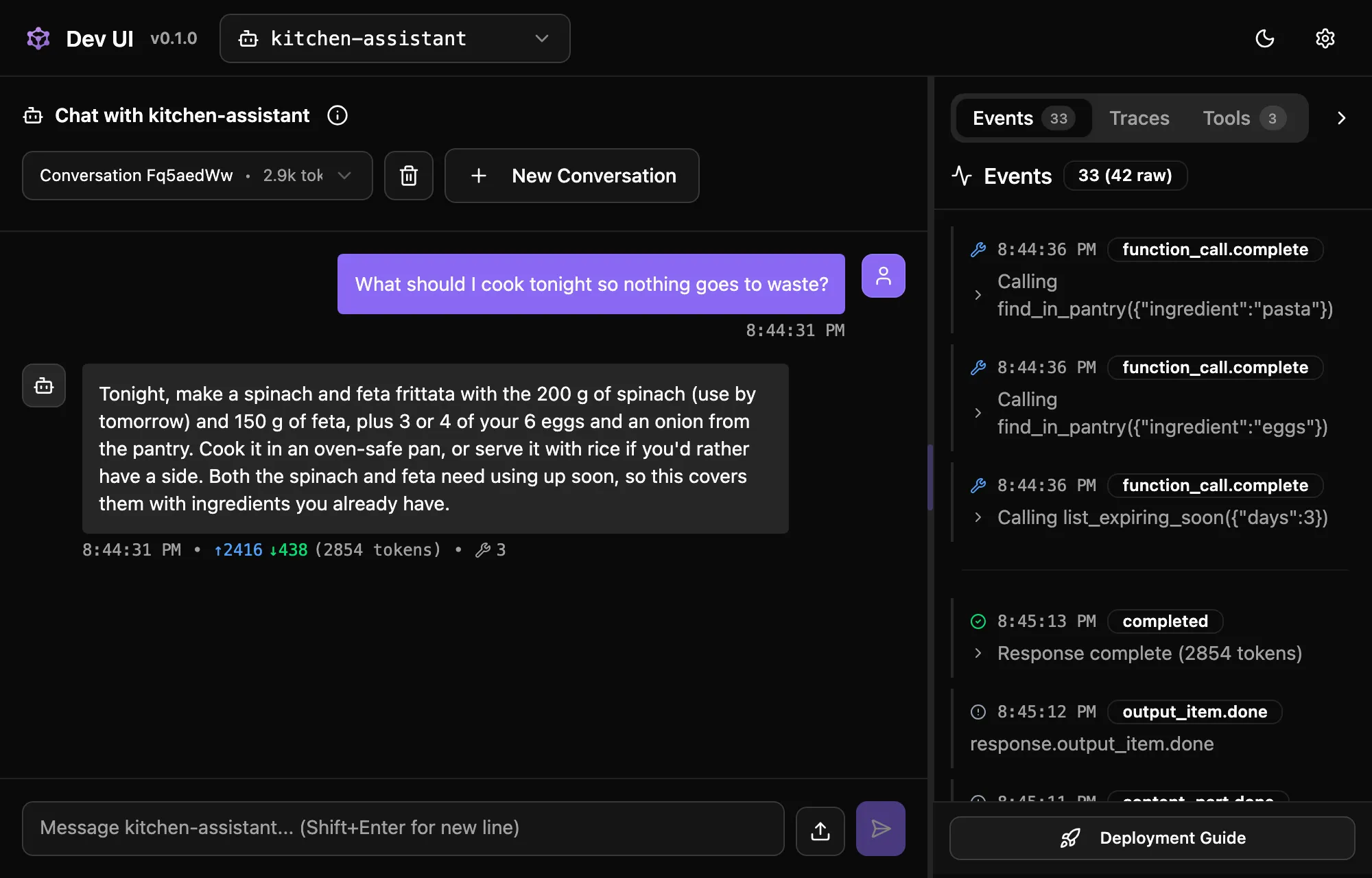
Opening DevUI on the kitchen assistant and asking “What should I cook tonight so nothing goes to waste?” gave this answer:
Tonight, make a spinach and feta frittata with the 200 g of spinach (use by tomorrow) and 150 g of feta, plus 3 or 4 of your 6 eggs and an onion from the pantry. Cook it in an oven-safe pan, or serve it with rice if you'd rather have a side. Both the spinach and feta need using up soon, so this covers them with ingredients you already have.Under the answer DevUI printed the token counts, 2,416 in and 438 out, and a count of three tool calls. The agent listed what expires within three days and then looked up eggs and pasta: the Events panel next to the chat shows Calling list_expiring_soon({"days":3}) and two find_in_pantry calls, newest first, above the streamed text and the end of the response, and the Tools panel shows the same three calls with their arguments. What the tools returned is in the conversation DevUI stores, which the next section reads.
For the workflow, DevUI draws the graph instead of a chat: the planner and the reviewer, each with the long executor ID from the first workflow post, and an OutputMessages executor that BuildSequential adds at the end. “Configure & Run” asks for the input. With “Dinners for Monday, Wednesday and Saturday. We have salmon.” each executor turned green as it finished, and the events carried the streamed text of both agents. In this run the planner again put salmon in more than one dinner, and the reviewer replaced it with chicken to keep fish to one night a week. The turn token that the first workflow post had to send by hand is sent for you here: a workflow run as an agent sends it itself.
The workflow in DevUI v0.1.0 after a run with the same input:
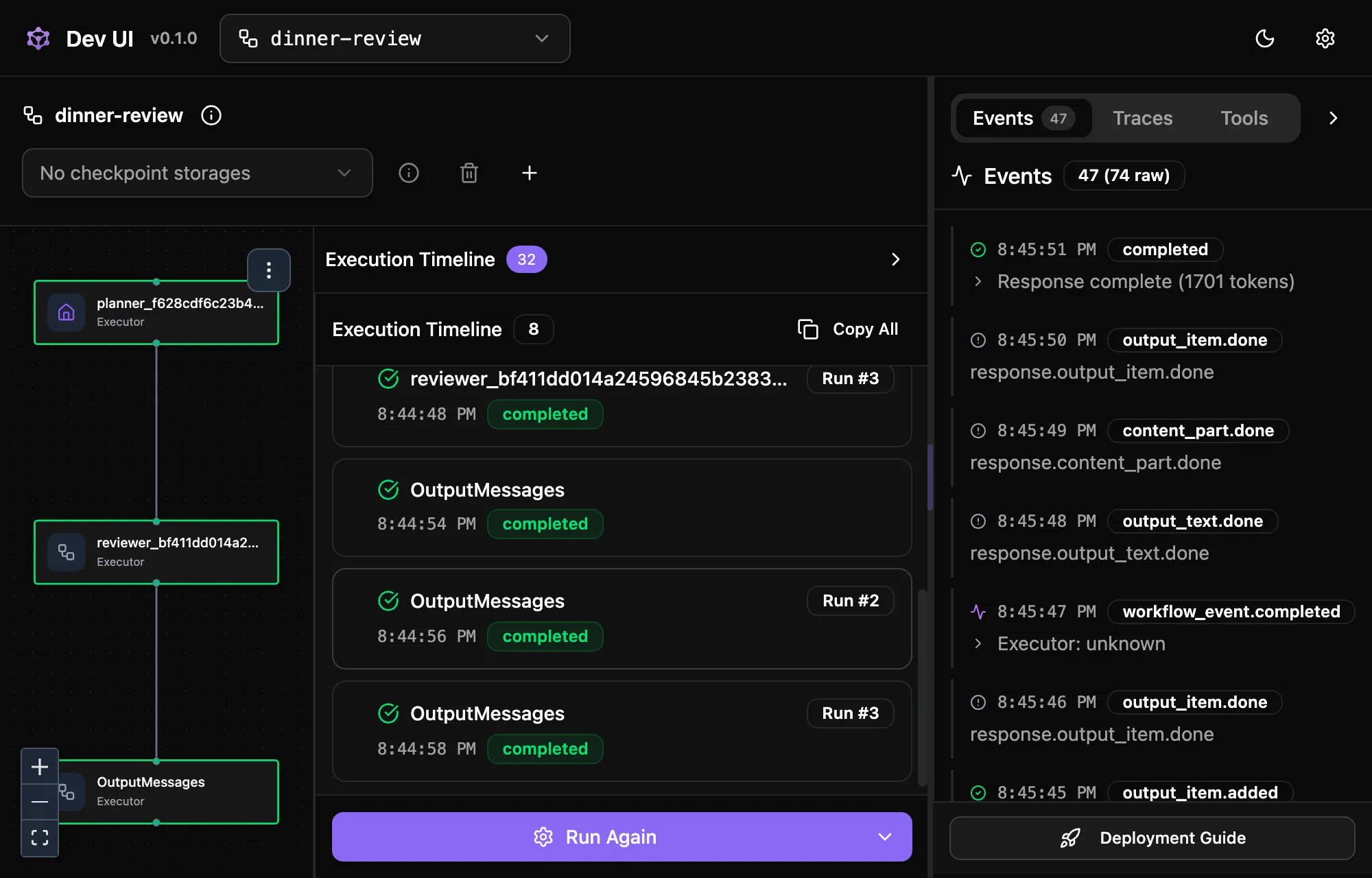
The timeline holds eight entries for one click, but the workflow ran once and called Claude twice, once per agent; a chat client that counted its calls saw two. DevUI adds a timeline entry for every message an executor handles, the turn token included, and numbers the repeats as runs.
DevUI sends the workflow its input as JSON text, {"input":"Dinners for Monday, Wednesday and Saturday. We have salmon."}, so the planner receives that string as its user message, braces included. The planner coped here, but a first executor that parses its input will see the wrapper.
The Traces tab stays empty. DevUI in a .NET app reports that it has no tracing, and traces in the Aspire dashboard are the subject of the tracing post.
DevUI keeps the conversation, the agent does not
A follow-up such as “And what about tomorrow night?” gets an answer that knows what was cooked tonight. The agent has no session here. The Responses endpoint does the remembering: DevUI creates a conversation first, sends its ID with every message, and the endpoint loads the stored items of that conversation as history before it runs the agent, then stores the new ones after it. The stored items of an earlier run of the same question, in which the agent called only list_expiring_soon, newest first:
message {'role': 'assistant', 'content': ['Tonight, make a spinach and feta dish, since the spinach (200 g) must be used by'], 'status': 'completed'}reasoning {'status': 'completed'}function_call_output {'status': 'completed', 'output': 'Today is 2026-10-14. Expiring: spinach (200 g, use by 2026-10-15); feta (150 g, use by 2026-10-17).'}function_call {'status': 'completed', 'name': 'list_expiring_soon', 'arguments': '{"days":7}'}reasoning {'status': 'completed'}message {'role': 'user', 'content': ['What should I cook tonight so nothing goes to waste?'], 'status': 'completed'}(The assistant text is cut to 80 characters by the script that printed it.) The stored history includes the tool call, its result and the reasoning items. On the next turn the tool call and its result are sent again; the reasoning items are not, and only the first 100 stored items of a conversation are loaded. That storage is in memory: restart the app and the conversations are gone. A console app or a test that calls the same agent with RunAsync and no session still forgets everything, as in the sessions post. An agent that seems to remember in DevUI proves nothing about the code that calls it elsewhere.
“Completed” doesn’t mean the answer is complete
The Responses endpoint in 1.24.0 never marks a response as incomplete. The same app with the output limit lowered to 64 tokens, asked for the three dinners through /v1/responses, returned this:
status completed incomplete None{'input_tokens': 85, 'input_tokens_details': {'cached_tokens': 0}, 'output_tokens': 64, 'output_tokens_details': {'reasoning_tokens': 0}, 'total_tokens': 149}['Monday: Lemon-herb salmon with roasted potatoes (salmon, lemon, dill, potatoes, olive oil)\nWednesday: Salmon teriyaki rice bow']The status is completed and incomplete_details is empty, while the text stops in the middle of “bowl”. DevUI shows such an answer as “Response complete”. The only sign is the output token count, which equals the limit. The check from the first post, FinishReason == ChatFinishReason.Length, has no counterpart on this endpoint, so a limit that is too low shows up in DevUI only as an answer that stops mid-word.
What DevUI shows, and to whom
The listing at /v1/entities is what DevUI reads to fill its menus. For the kitchen assistant it holds this, among other fields:
"id": "kitchen-assistant","type": "agent","tools": ["find_in_pantry", "list_expiring_soon"],"metadata": { "chat_client_provider": "anthropic", "provider_uri": "https://api.anthropic.com/", "provider_name": "anthropic", "agent_type": "ChatClientAgent"},"instructions": "You help one household decide what to cook.\nCheck the pantry with your tools before suggesting a dish.\nPrefer ingredients that expire soon. Answer in at most\nthree sentences.","model_id": "claude-haiku-5-5",The full instructions, every tool name and the model, for every agent the app registers, and the complete graph of every workflow. That is why DevUI only answers callers on the same machine by default. With the app listening on all interfaces and called from another machine on the network, the page and the listing both answer:
HTTP/1.1 403 ForbiddenContent-Type: application/problem+json{"type":"https://tools.ietf.org/html/rfc9110#section-15.5.4","title":"DevUI access denied","status":403,"detail":"DevUI is restricted to loopback callers by default. Enable AllowRemoteAccess to permit remote access."}The app logs a warning for each rejected request: Rejected non-loopback DevUI request from <address>. Set DevUIOptions.AllowRemoteAccess to permit remote callers. A request without any remote address counts as remote too. ASP.NET Core’s in-memory test server sends exactly that, so an integration test against DevUI gets 403 until it sets an address. The sample’s tests set one.
AddDevUI takes options for a shared development server:
AllowRemoteAccess = truelets callers on other machines in. Set without either of the next two options, the app logs at startup:DevUI is configured with AllowRemoteAccess=true and no authentication. Set DevUIOptions.AuthToken, the DEVUI_AUTH_TOKEN environment variable, or attach an authorization policy via ConfigureEndpoints.AuthToken, or theDEVUI_AUTH_TOKENenvironment variable when the option is empty, requiresAuthorization: Bearer <token>on every DevUI request, the page included. Without it the answer is 401, “DevUI authentication required”. Only/metastays open, so the page can find out that a token is needed.ConfigureEndpointsgets DevUI’s route group, for a real authorization policy such asgroup => group.RequireAuthorization("DevUIPolicy"). The DevUI README recommends this over the shared token for anything beyond development.
The Responses endpoint is not behind that check
The loopback check and the token cover DevUI’s own routes: the page and /v1/entities. /v1/responses and /v1/conversations are separate routes, mapped by separate calls, and nothing guards them. From the same other machine that got the 403, a POST to /v1/responses with "metadata":{"entity_id":"planner"} ran the planner on Claude and returned its plan, on the app’s API key. Anyone who can reach those routes can run any registered agent and its tools, and read back stored responses by ID.
That is why the sample registers and maps all six calls inside the Development checks, and not only MapDevUI. Outside Development, /devui/, /v1/entities, /v1/responses and /v1/conversations all answer 404, and the sample’s tests check each of them. An app that needs the Responses endpoint in production should treat it as an API of its own: the 1.24.0 documentation says MapOpenAIResponses adds no authorization, that callers of both it and MapOpenAIConversations must be authenticated, for example with RequireAuthorization() on the returned route group, and that an app with several users needs an AgentIsolationKeyProvider so one caller can’t read another’s conversations.
When agents live in separate services, the preview package Aspire.Hosting.AgentFramework.DevUI adds a DevUI resource to the AppHost that lists the agents of several services and forwards each request to the right one. Its README carries the same warning: protecting the dashboard or the DevUI page does not protect the agent services’ own endpoints.
Try it
- Start the app with
dotnet run --project KitchenBench -e ASPNETCORE_ENVIRONMENT=Productionand open/devui/. It answers 404, and so does a POST to/v1/responses. Setting the variable in the shell doesn’t work: the launch profile sets Development. - Lower the output limit in
AsIChatClientto 64, ask the kitchen assistant a question in DevUI, and compare the output token count under the answer with the limit. DevUI still reports the response as complete.